DvPayLite Deep Linking Integration - Intent Mode
Enables Android applications to navigate to specific screens or perform actions by sending Android Intents with the required parameters to the target application.
Version History
| Date | Version | Details |
|---|---|---|
| 01/06/23 | 1.0.0 | Initial release |
| 19/06/23 | 1.0.1 | Architecture diagram revised, and AndroidManifest.xml added. |
| 28/06/23 | 1.0.2 | Tip Adjust API added |
| 14/07/23 | 1.0.3 | Added Preauth and Ticket in transaction API |
| 07/11/23 | 1.0.4 | Updates: Device detail API, Get TPN API, Status check API, and enhancements to existing APIs. |
| 21/11/23 | 1.0.5 | Updates: Debugging signing configurations updated for terminal use, and Administrative Txn API added. |
| 26/04/24 | 1.0.6 | Updates: Added information on 3rd party app installation in P terminals. |
| 13/09/24 | 1.0.7 | Updates: Request tags for payment type and receipt type updated in the performTransaction API. |
| 19/06/25 | 1.0.8 | Updates: Tags updated for features that support optional transaction status screen and IsvId. |
| 22/10/25 | 1.0.9 | Added Level 3 / VISA CEDP Line Items Tags |
| 26/11/25 | 1.1.0 | Gift - transactions enabled |
| 28/01/26 | 1.2.1.6 | Merchant ID added |
| 11/03/26 | 1.2.2.1 | New tag has been introduced to check EBT Balance Inquiry via deeplinking Balance (applies only for EBT_Food/EBT_Cash) |
| 27/04/26 | 1.2.2.4 | Added Custom UI configuration that allows users to customize the DvPayLite interface |
Prerequisites
- iPOSpays-powered Dejavoo terminal
- Login credential to iPOSpays
- The host application must be listed on DvStore. If you haven't done so already, please fill out the necessary form to list your application. List now
For Sandbox (UAT)
Users should be onboarded on iPOSpays sandbox(UAT) environment as a merchant and have a valid TPN. DvPayLite application build should be production.
For Production (Live)
Users should be onboarded on iPOSpays production environment as a merchant and have a valid TPN. DvPayLite application build should be production.
If you do not have a TPN, contact your ISO or devsupport@dejavoo.io
Set Up the Developer Environment
1. Android Studio IDE
- A Download and set up Android Studio from developer.android.com
Develop Android Application
-
Create a new Android project or use an existing one.
-
Configure the following snippets in your
build.gradleandsettings.gradlefiles.
Configure Gradle
1. Add Dependency
Include the following dependency in your project’s build.gradle file:
com.denovo:invoke-dvpay-lite:1.2.2.7
2. Add Permission
Include the following permission in your AndroidManifest.xml file:
<uses-permission android:name="android.permission.QUERY_ALL_PACKAGES" />
To obtain the library file containing the access key and secret key required for integration, please Contact devsupport@dejavoo.io. Make sure to CC your Dejavoo representative when sending your request.
Configure settings.gradle - reach devsupport@dejavoo.io for getting access key and secret key
Add Signing Configuration
1. Configure Signing for Debug Build
Add the following lines to your project’s build.gradle file for running the application with a signature:
signingConfigs {
      debug {
            storeFile file(“kozen.jks”)
            storePassword “ ”
            keyAlias “ ”
keyPassword “ ”
v1SigningEnabled true
v2SigningEnabled true
}
     }
buildTypes {
    debug {
        signingConfig signingConfigs.debug
        …….
        }
    }
2. Download the kozen.jks File
To download the kozen.jks file, click on the highlighted text that reads “kozen.jks“
Install DvPayLite Application
Ensure the DvPayLite application is installed on the payment terminal. If it is not installed, go to DvStore to install the DvPayLite application before proceeding with the integration.
Version Control and Updates
-
Non-breaking changes:
- We will continue to enhance the API by adding new functionality and fixing bugs over time.
- These updates may include:
- New endpoints
- Additional attributes for existing objects
- Such changes will not require a new API version. Ensure your code can handle new attributes gracefully and does not rely on the order of returned records unless explicitly specified in the documentation.
-
Breaking changes:
- We aim to maintain the current API version for the foreseeable future.
- In the event of changes that break the current API's functionality, a new version number will be released to ensure backward compatibility with existing integrations
- Refer to the Version History to review the version history of this document.
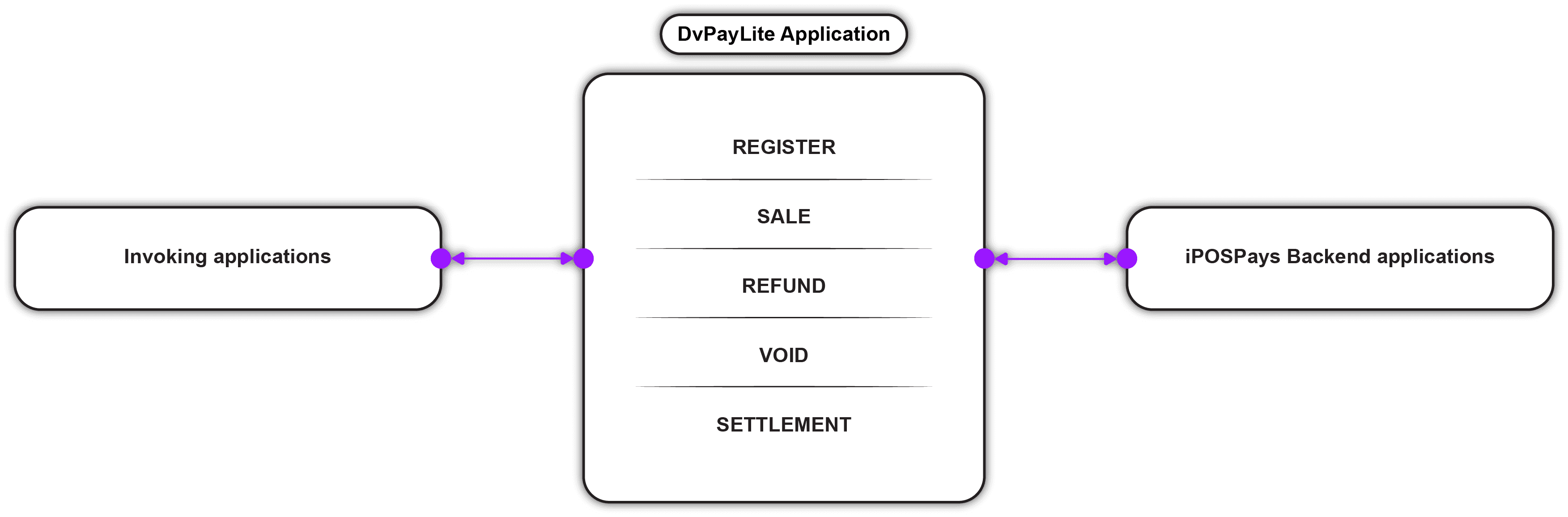
High-Level Flow
The following is a high-level flow to communicate with the DvPayLite Application.
Initialize the Application
To invoke the DvPayLite application, developers must initialize it within the invoking app using the following set of lines.
activityResultLauncher = registerForActivityResult(ActivityResultContracts.StartActivityForResult())
{ result: ActivityResult ->

intentApplication.handleResultCallBack(result)

}

intentApplication = IntentApplication(requireContext())
APIs
Device Register API
The Device Register API is used to download both the terminal configuration and merchant configuration data from the backend application into the DvPayLite application.
Request Parameters:
| Field | Description | Sample |
|---|---|---|
| tpn | It’s a Unique 12-digit code. This value is unique for each merchant. | 123456789012 |
| applicationType | The application type is used to identify the application | DVPAYLITE |
Response Details:
- onTerminalAdded
| Field | Description | Example |
|---|---|---|
| message | It’s a Unique 12 digit code. This value is unique for each merchant. | Terminal Added Successfully |
| isValidTPN | Indicates whether the TPN is valid | true |
| assignedBuildNumber | Build number assigned to this transaction or request | (Empty in this case) |
- onTerminalAddFailed
| Field | Description | Example |
|---|---|---|
| error_code | Error code indicating the type of error | 15 |
| error_message | Message describing the error | TPN is not Configured |
Snippet code
jsonRequest = {“tpn”:”123456789012”, “applicationType”:”DVPAYLITE”}

InvokeApp.intentApplication.setTerminalAddListener(object : TerminalAddListener {

    override fun onApplicationLaunched(addTerminal: JSONObject?) {
        // application launched success json data
    }

    override fun onApplicationLaunchFailed(errorResult: JSONObject) {
        // application launched failed json data
    }

    override fun onTerminalAdded(terminalResult: JSONObject?) {
        // Terminal added json data
    }

    override fun onTerminalAddFailed(errorResult: JSONObject) {
        // Terminal add failed json data
    }

})

InvokeApp.intentApplication.addTerminal(jsonRequest, InvokeApp.activityResultLauncher)
Custom UI Configuration
Customize the DvPayLite interface by passing a customUI object in the request payload. This allows you to align the payment experience with your brand by controlling colors, typography, and select UI behaviors.
All configured attributes are applied dynamically at runtime. If a primary or secondary color is provided, all associated UI elements inherit that styling automatically.
For this to work, include the following dependency version in your project’s build.gradle file:
com.denovo:invoke-dvpay-lite:1.2.2.7Color Configuration
Primary Color
Controls the main interactive and highlight elements across the UI.
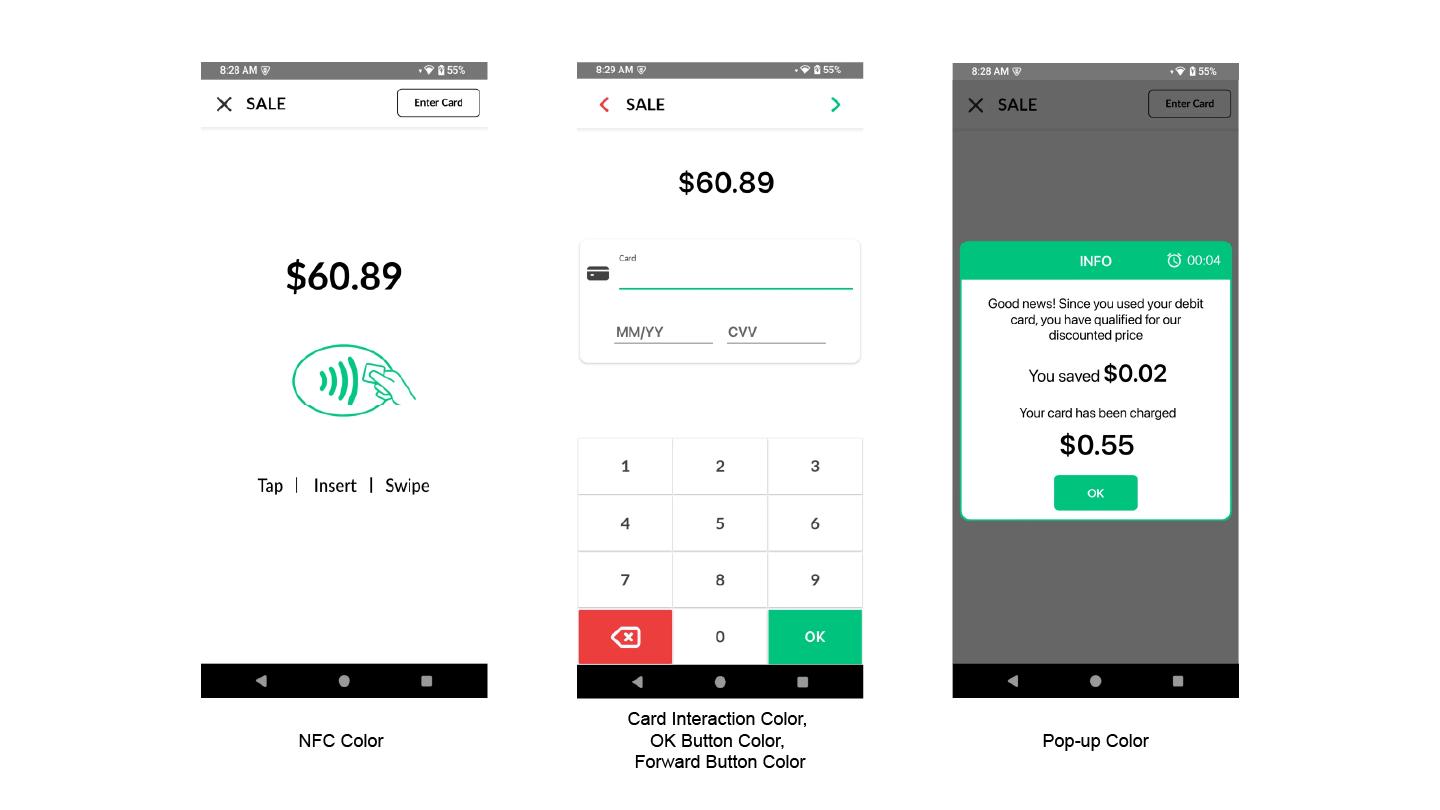
Applies to:
-
NFC indicator color
-
Card interaction elements
-
OK button (keypad)
-
Forward button
-
Pop-up accents
If set, all associated components automatically update to reflect the selected color.
Secondary Color
Controls supporting and informational UI elements.
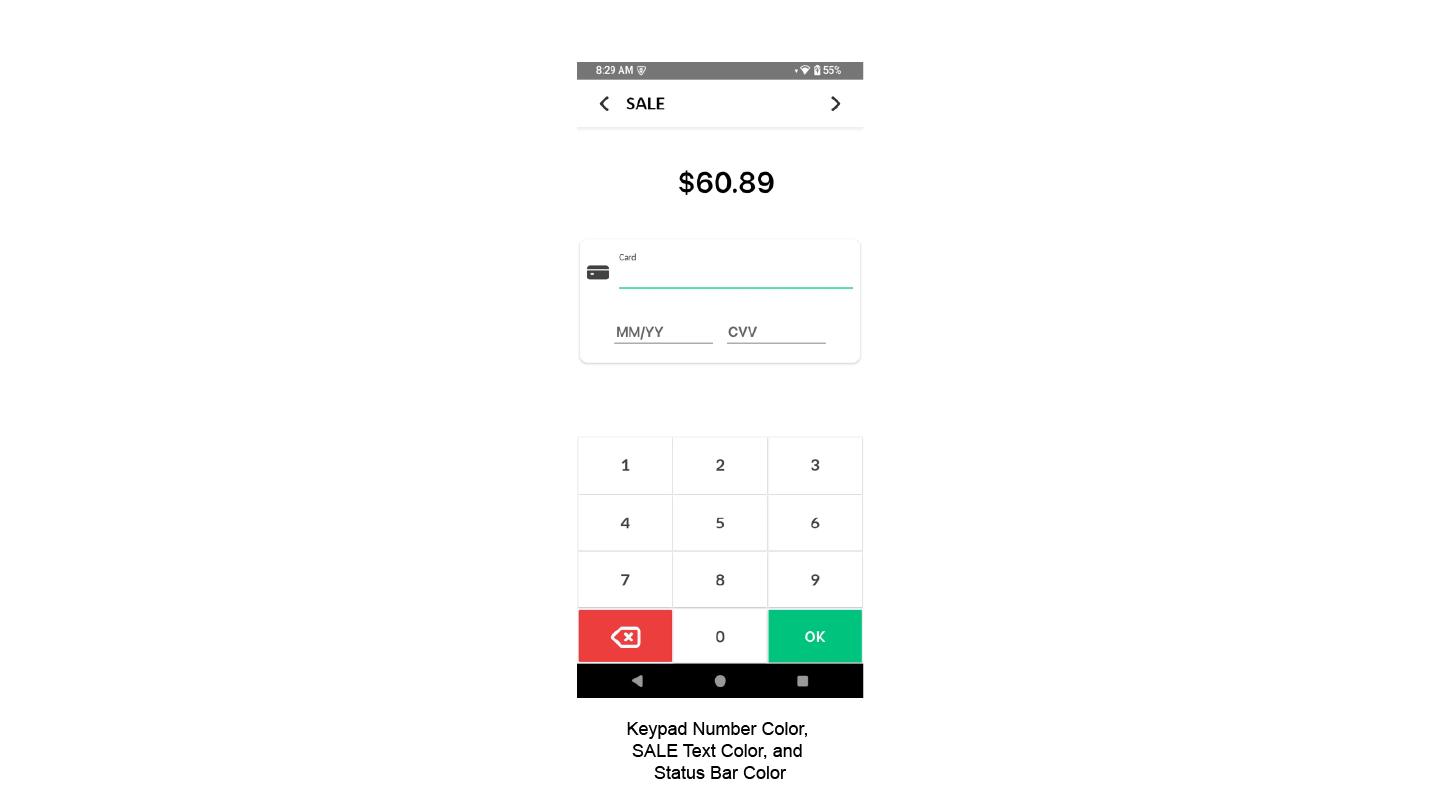
Applies to:
-
Text (e.g., “SALE”)
-
Status bar
-
Keypad numbers
-
“Enter Card” toolbar text
If set, all associated components automatically update to reflect the selected color.
Negative Color
Controls destructive or dismissive actions.
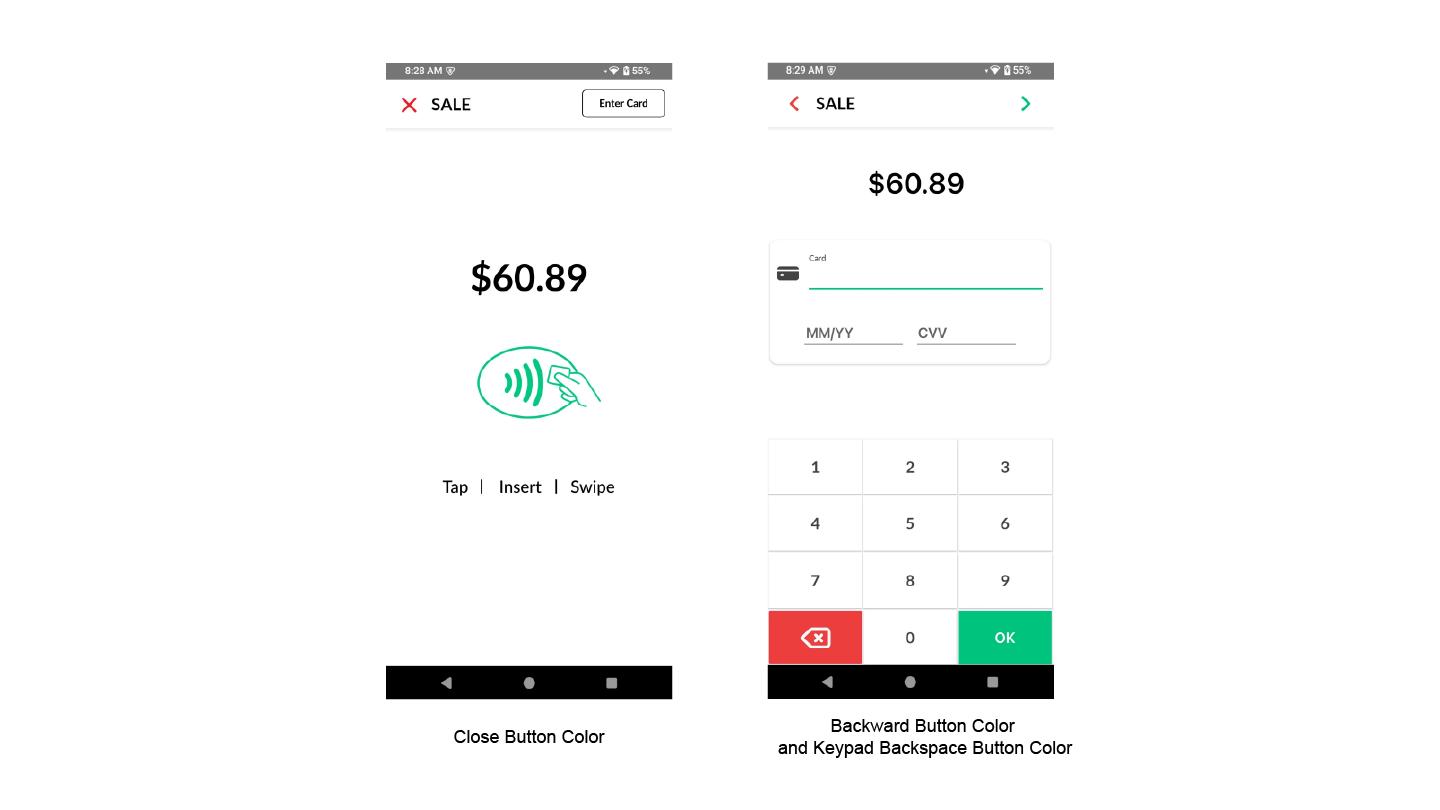
Applies to:
-
Cancel / Close / No buttons
-
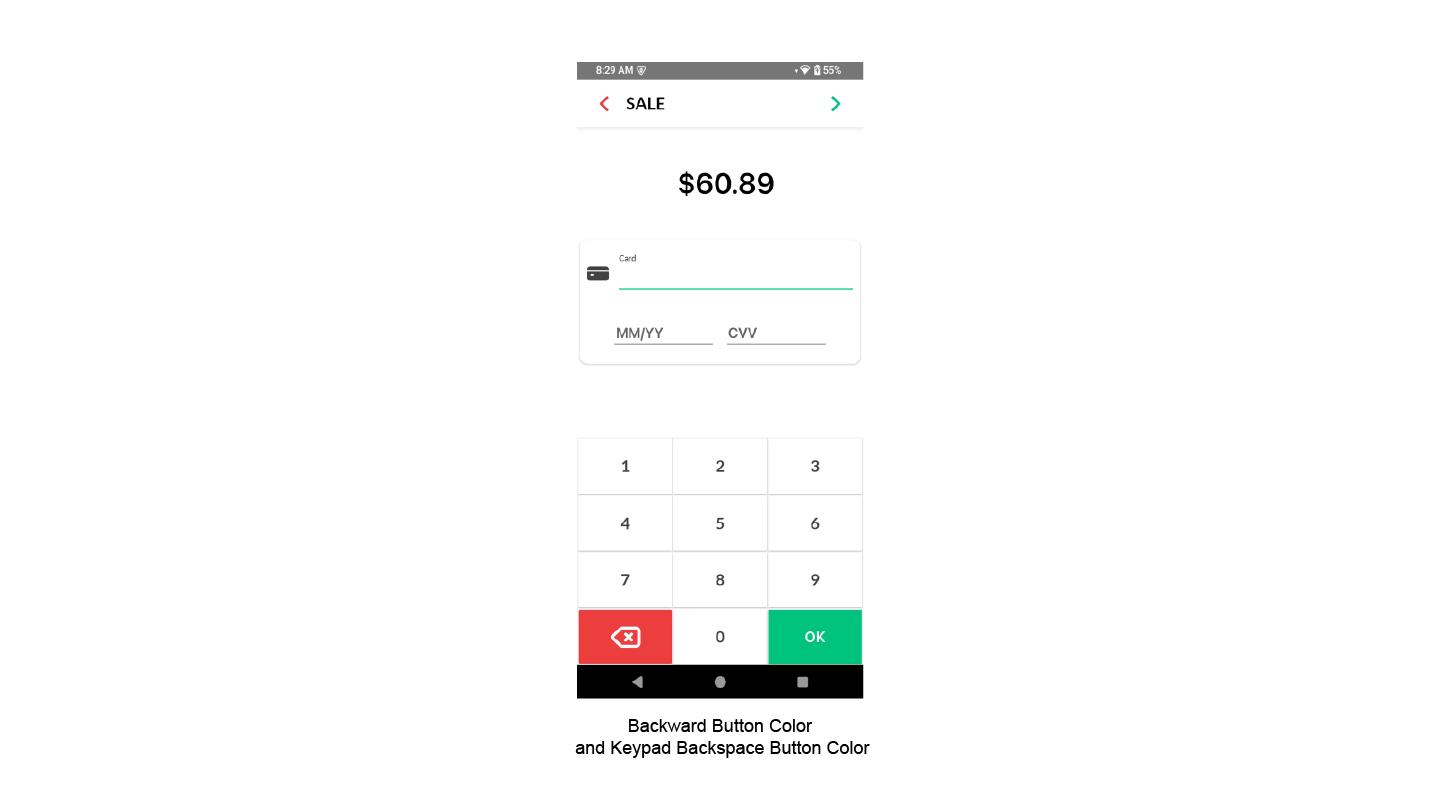
Keypad backspace button
-
Close icon
-
Backward button
-
Pop-up negative actions
If set, all negative-action elements will use this color consistently.
Typography
You can specify one of the supported fonts:
-
Inter
-
Roboto
-
Open Sans
-
Poppins
-
Lato
Behavioral Controls
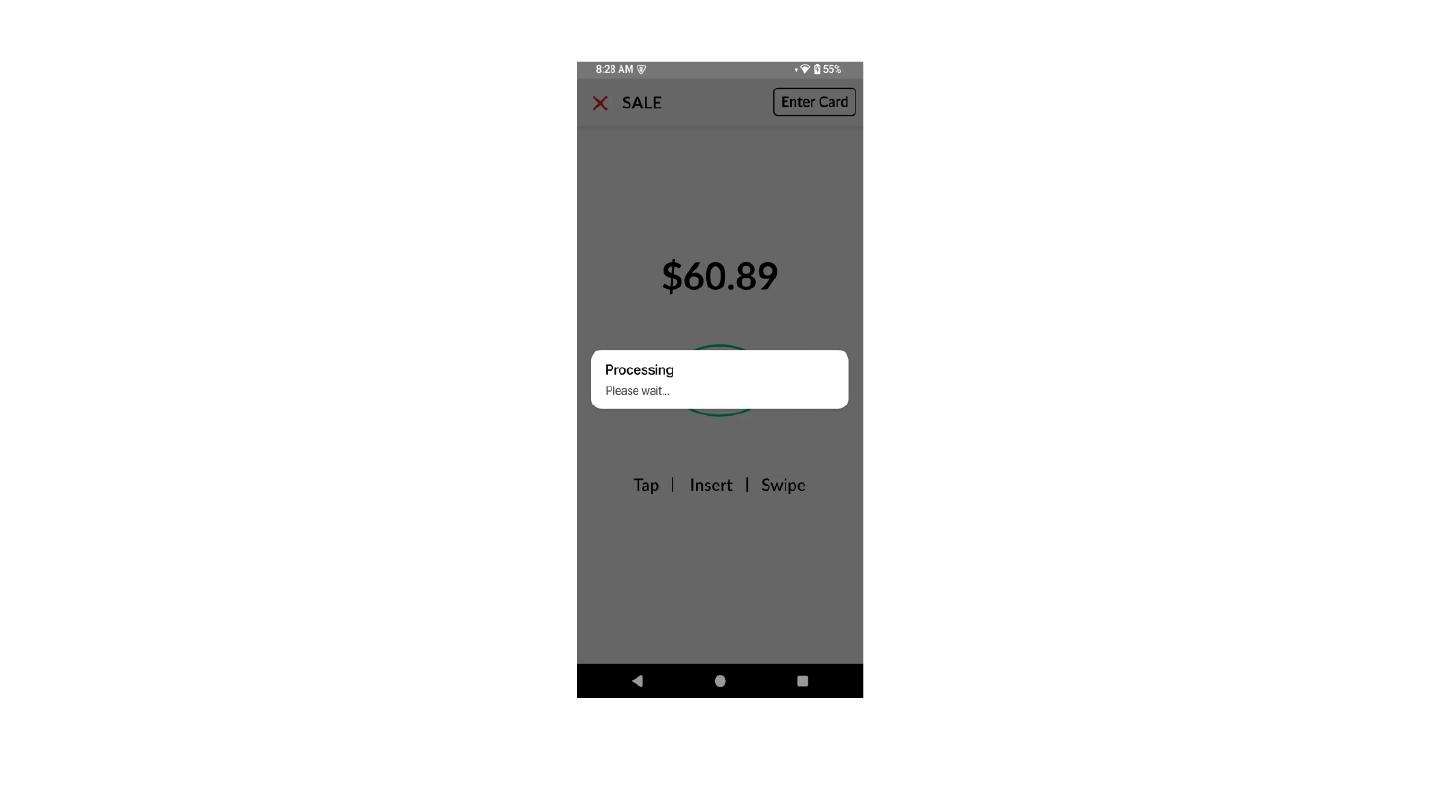
- Remove Loader
If enabled, the loader animation is removed and the text “Processing” and “Please Wait” is left-aligned.
- AVS Fields Control
If AVS is disabled, Street and ZIP fields are removed. Only:
-
Card Number
-
Expiry (MM/YY)
-
CVV will be displayed.
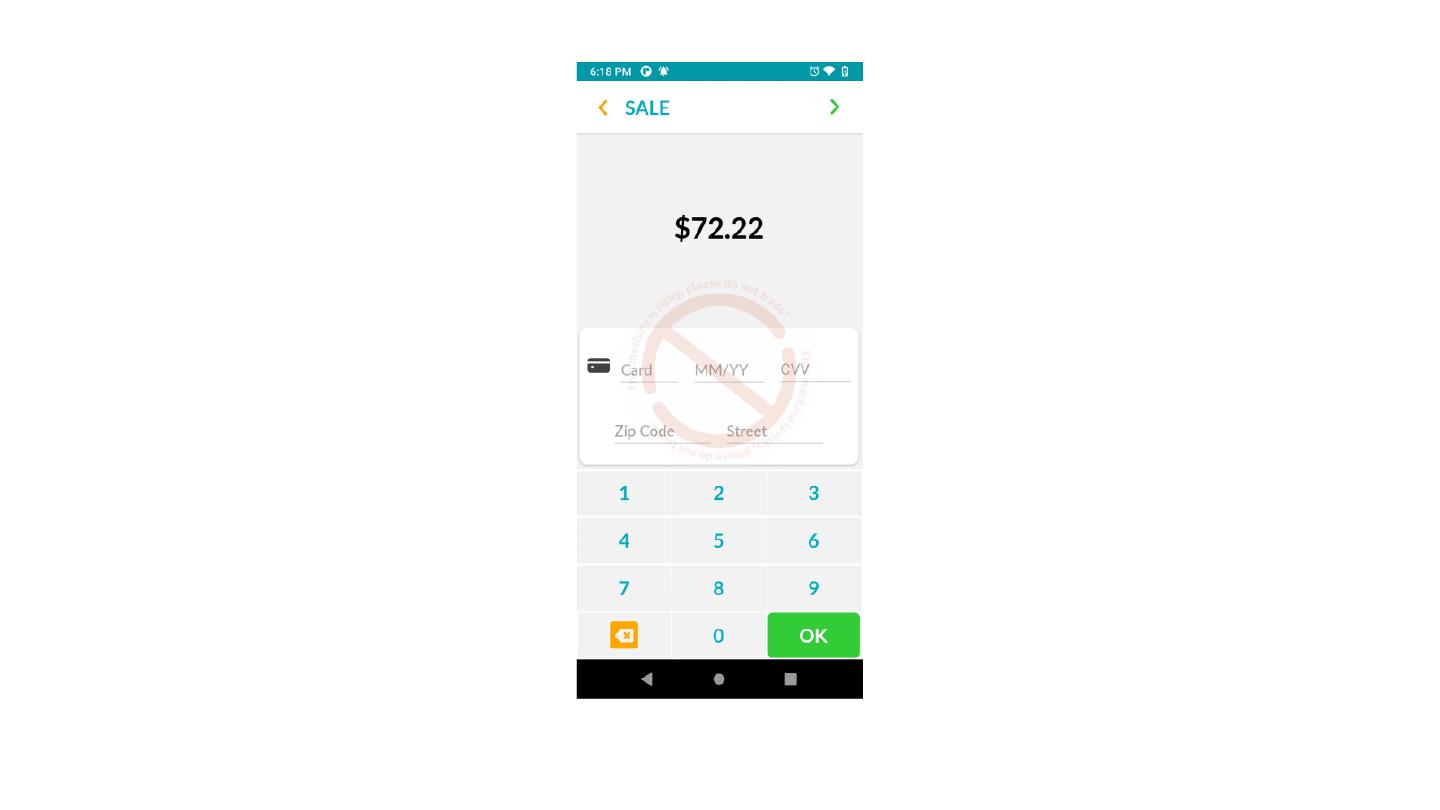
Application-Level UI Behavior
-
Forward and Backward buttons dynamically update based on the configuration.
-
Card icon color aligns with the selected theme.
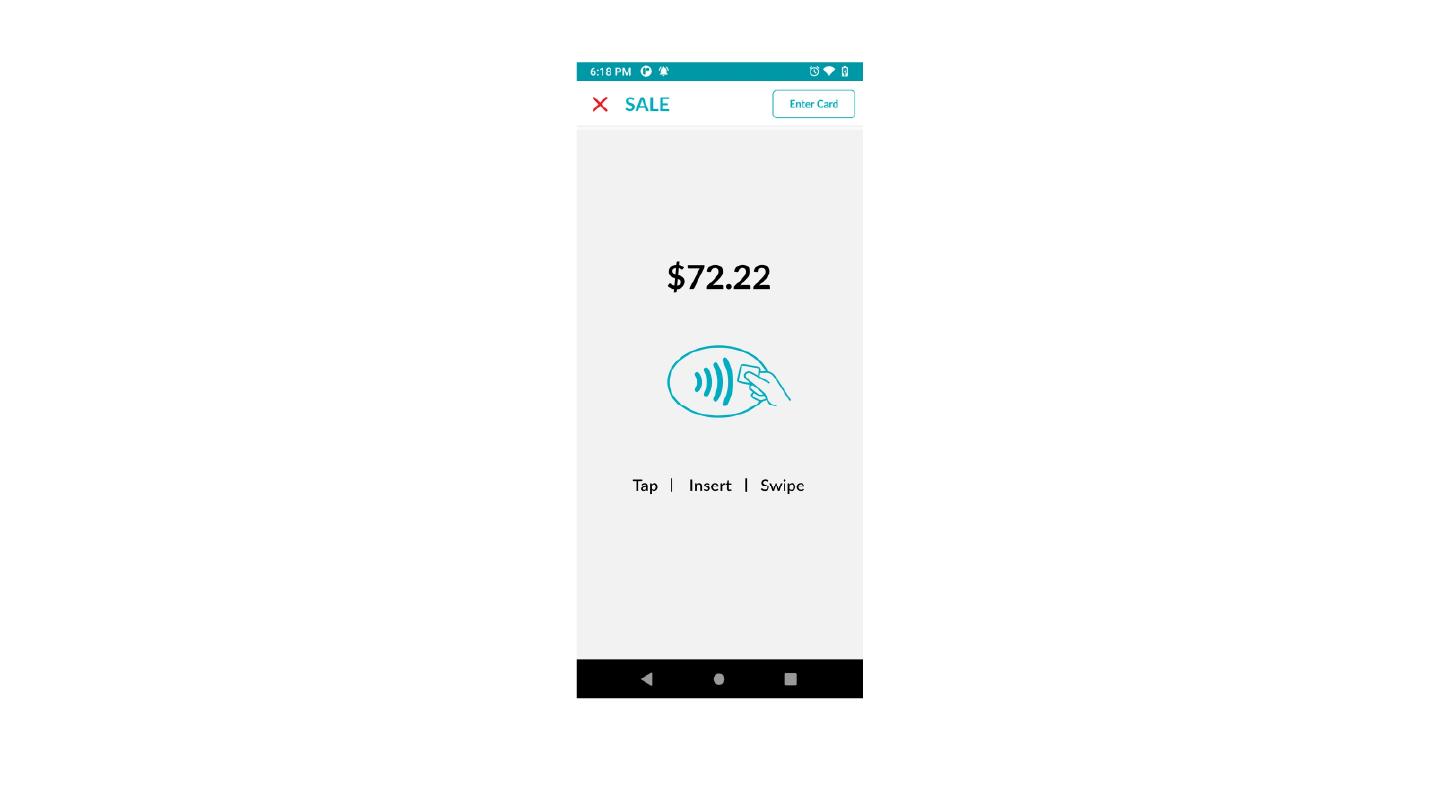
Layout Adjustments:
-
The close button moves to the left.
-
If no alternative payment methods exist:
-
“Enter Card” moves to the top-right
-
NFC animation replaces the default GIF
-
Tap/Insert/Swipe divider color updates
-
Layout spacing and alignment are optimized
-
Notes
-
When using deep linking, the DvPayLite logo is removed.
-
If the loader is removed, “Processing Please Wait” is left-aligned.
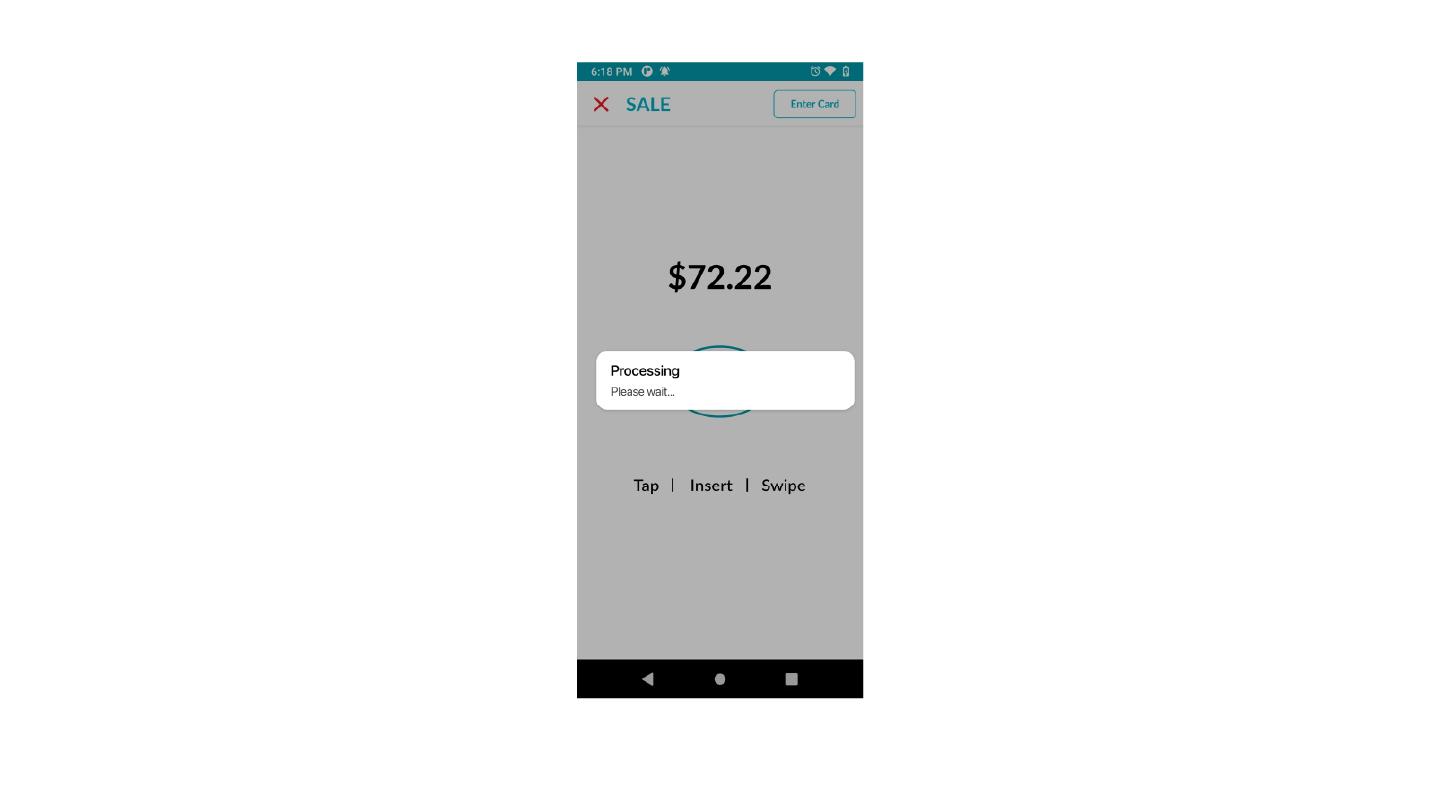
- Additional layout simplifications apply when the loader and outer stroke are removed.
Payment Method Behavior
- Gift Cards → Only Swipe is supported and displayed
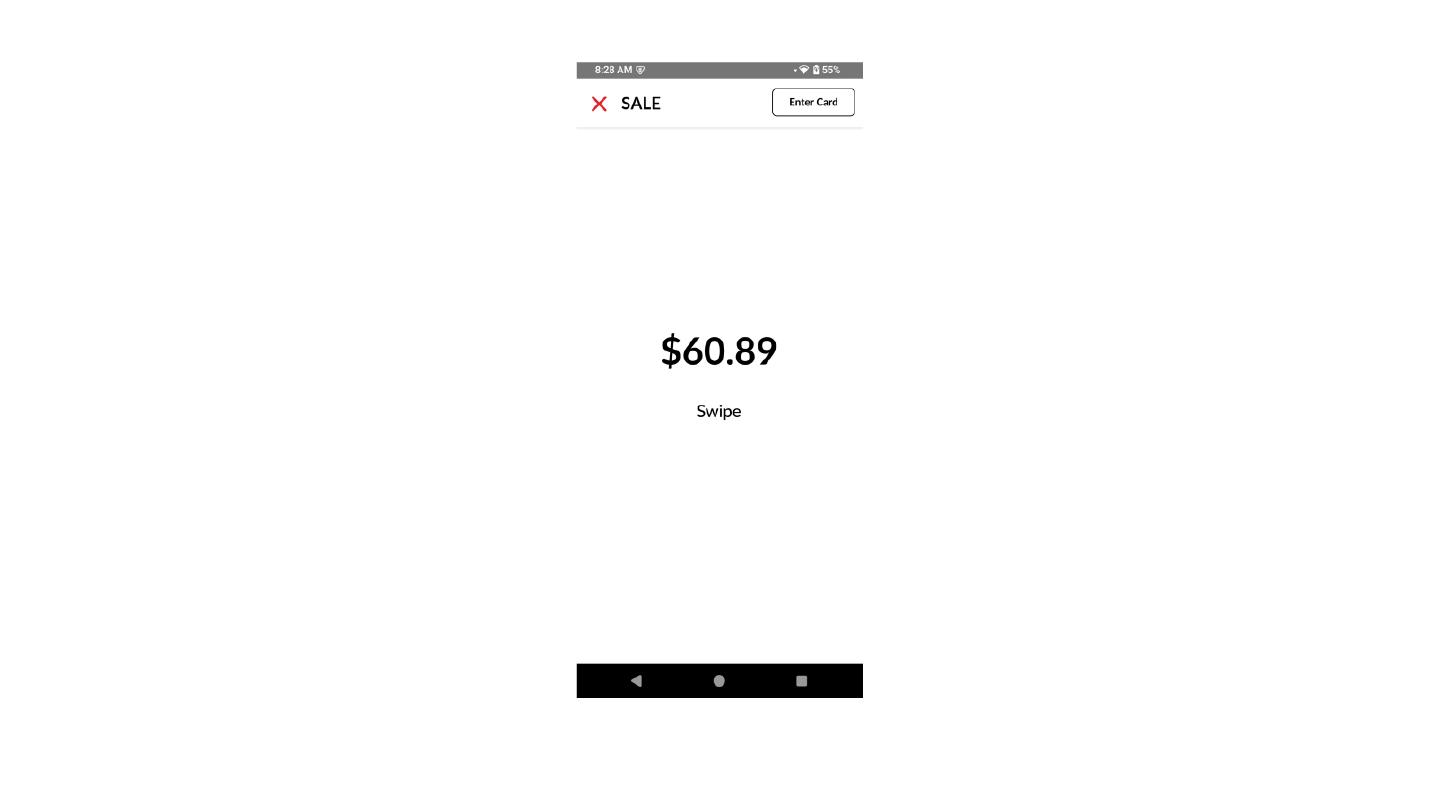
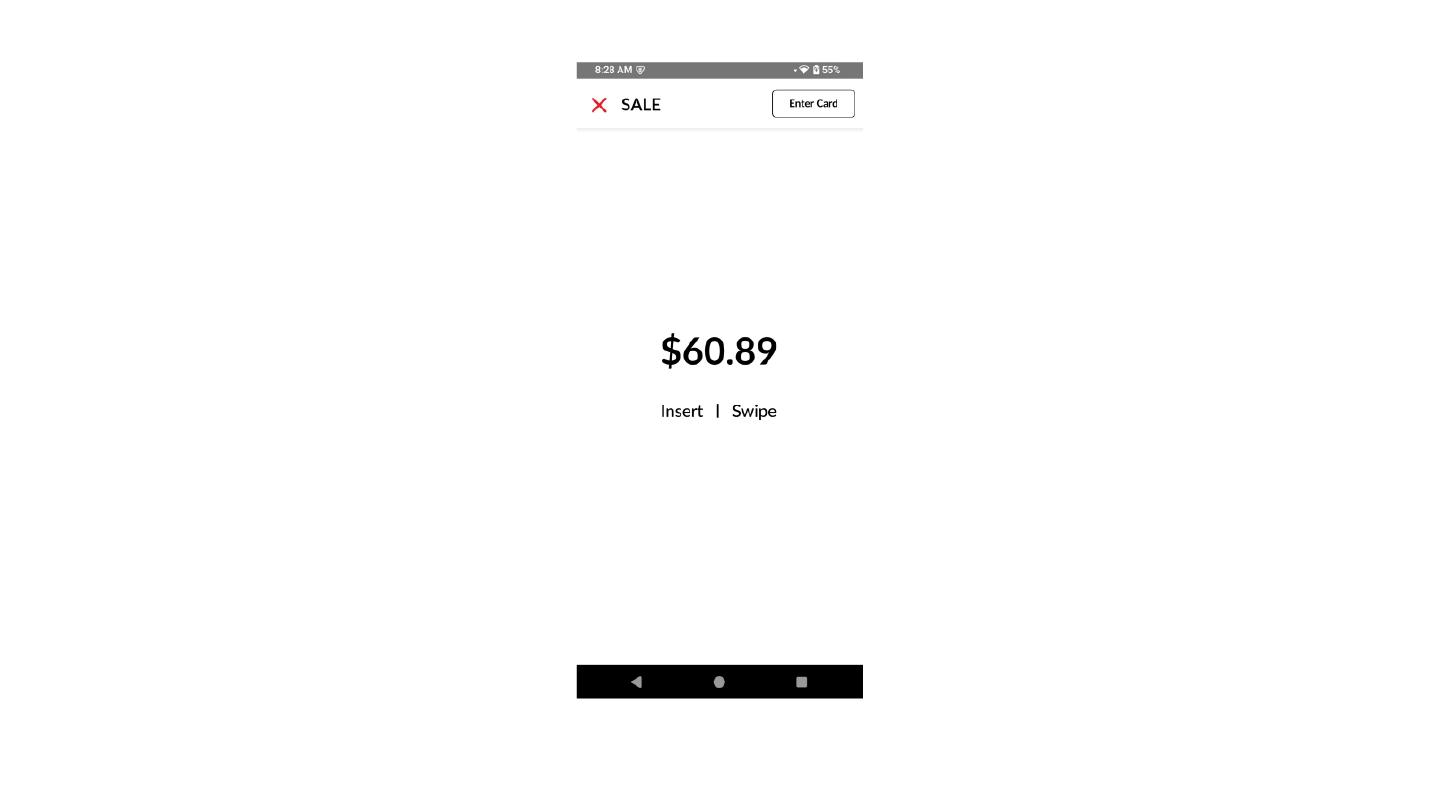
- Insert/Swipe only flows → UI adjusts to show only applicable methods
{
    "amount": "100.00",
    "applicationType": "DVPAYLITE",
    "customUI": {
        "fontFamily": "open sans",
        "negativeButtonColor": "Ed3e3e",
        "primaryColor": "3c6850",
        "removeLoaderLogo": "YES",
        "requiredAvs": "YES",
        "secondaryColor": "000000"
    },
    "isTxnStatusScreenRequired": "No",
    "paymentType": "Credit",
    "receiptType": "receiptType",
    "refId": "DL517783305716",
    "showBreakupScreen": "Yes",
    "showDualPriceScreen": "No",
    "showTipScreen": "No",
    "tip": "0.00",
    "type": "SALE"
}
Request Parameters
| Field | Type | Description | Example |
|---|---|---|---|
| amount * | string | Transaction amount | 100.00 |
| applicationType * | string | Application identifier | DVPAYLITE |
| customUI | object | UI customization object | — |
| customUI.fontFamily | string | Font used in UI | open sans |
| customUI.primaryColor | string | Primary theme color without # | 3c6850 |
| customUI.secondaryColor | string | Secondary/supporting color | 000000 |
| customUI.negativeButtonColor | string | Color for negative actions | Ed3e3e |
| customUI.removeLoaderLogo | string | Removes loader and aligns text left | YES |
| customUI.requiredAvs | string | Enables AVS fields such as Street and ZIP | YES |
| isTxnStatusScreenRequired | string | Displays transaction status screen | No |
| paymentType * | string | Payment method type | Credit |
| receiptType | string | Receipt format/type | receiptType |
| refId * | string | Unique transaction reference ID | DL517783305716 |
| showBreakupScreen | string | Displays amount breakdown screen | Yes |
| showDualPriceScreen | string | Displays dual pricing screen | No |
| showTipScreen | string | Enables tip selection screen | No |
| tip | string | Tip amount | 0.00 |
| type * | string | Transaction type | SALE |
Perform Transaction API
The Perform Transaction API is used to invoke the DvPayLite application to process transactions. It supports the following transaction types: SALE, REFUND, VOID, PRE_AUTH, INC_AUTH, TICKET, ACTIVATE, INQUIRE, REDEEM, REISSUE, REFUND, VOID.
For pin-based transactions, keys must be injected into the terminal. To inject the keys, please contact the developer support team at devsupport@dejavoo.io.
Request Parameters:
| Field | Description | Sample |
|---|---|---|
| type | Transaction type should be any one of the following [SALE, REFUND, VOID, PRE_AUTH, INC_AUTH, TICKET, ACTIVATE, INQUIRE, REDEEM, REISSUE, REFUND, VOID, Balance (applies only for EBT_Food/EBT_Cash)] | SALE |
| paymentType | Payment Type [CREDIT,DEBIT,EBT_Food,EBT_Cash, Gift, Loyalty] | CREDIT |
| amount | Transaction Amount | 10.00 |
| tip | Transaction Tip Amount (Applicable only for sale and ticket) | 1.00 |
| applicationType | The application type is used to identify the application | DVPAYLITE |
| refId | Transaction reference id (Should be unique for sale, refund, and Pre_Auth and should be original sale ref id for void and pre_auth refund for ticket) | 1234567890 |
| receiptType | Type of receipt Possible Options - [Merchant, Customer, Both, No] | Merchant |
| isTxnStatusScreenRequired | Provides flexibility to display the transaction status screen in payment application Possible Options - [Yes, No] | Yes |
| IsvId | Unique Id that is provided to each ISV while starting the integration (should contact support team/sales rep to get this ID) | 432423434 |
| showBreakupScreen | Provides flexibility to display break down screen while processing the transaction (break down should be enabled state in TPN configuration for this to reflect) Possible Options - [“Yes”, “No”] | Yes |
| showTipScreen | Provides flexibility to display tip screen while processing the transaction Possible Options - [“Yes”, “No”] | Yes |
| reconId | Used for reconciliation purposes. This field is applicable only for Fiserv North and Elavon transactions and it is optional. For Elavon, the value must be 24 characters. For Fiserv North, the value must be 11 characters. | FSRV12345A |
| MerchantId | When Multi MID (MMID) is enabled, the MerchantId must be provided. This should be the TPN (Terminal Provider Number) through which the transaction is intended to be processed. | 123456789012 |
| TPN | This is optional. Provide the TPN by default; if MultiMID is enabled, provide the Master TPN. | 12121121212 |
Response Details
| Field | Description | Example |
|---|---|---|
| authCode | Authorization code received from the payment processor | DSC058 |
| LTaxAmount | Local Tax Amount | 2.40 |
| STaxAmount | State Tax Amount | 1.20 |
| extData | Extended data related to the transaction (e.g., partial approval info, void status): 1. Partial approval transaction pending amount - due amt 2. CDCVMIndicator: Contactless Digital Wallet Transaction Indicator Indicates that a contactless transaction was completed using a mobile digital wallet (e.g., Apple Pay or Google Pay).The indicator is typically sent as (D) when a digital wallet is detected. | {"dueAmnt":"0.00",
"approvedAmnt":"",
"isPartialApprovalTxn":false,
"CDCVMIndicator":"D",
"voided":"false"} |
| L2/L3 Validation Error | The reason for an L2/L3 failure is returned under the extData tag. | "extData" :
{"dueAmnt":"0.00" ,
"approvedAmnt":"",
"isPartialApprovalTxn":false,
"voided":"false",
"l2l3ValidationError" :
{"PoNumber": "Is missing or invalid"}} |
| L3flag | If the transaction is completed as Level 2/Level 3 (L2/L3) using a commercial card, the result will be Y, its returned under the extData tag. | "extData":"
{"dueAmnt":"0.00",
"approvedAmnt":"",
"isPartialApprovalTxn":false,
"voided":"false",
"L3Flag":"Y"} |
| batchNo | Batch number associated with the transaction | 444 |
| card_type | Type of card used for the transaction (e.g., VISA, MASTER, DISCOVER) | JCB |
| merchant | Data to be printed on Merchant receipt along with the format and alignment in xml format. [ C - center, R- Right, L- Left, N- Normal, B- Bold] | |
| customer | Data to be printed on Customer receipt along with the format and alignment in xml format. [ C - center, R- Right, L- Left] | |
| expDate | Expiry date of the card | 12/25 |
| emvTVR | EMV Terminal Verification Results | 0000008000 |
| emvTC | EMV Transaction Certificate | F23A1C0D45678910 |
| emvTSI | EMV Transaction Status Indicator | E800 |
| emvAppName | EMV Application Name (for chip card transactions) | VISA CREDIT |
| emvAID | EMV Application Identifier (for chip card transactions) | A0000000041010 |
| date | Transaction date | 2024-10-01 |
| disclaimer | Statement acknowledging the cardholder’s receipt of goods and agreeing to cardholder obligations | Cardholder acknowledges receipt of goods |
| fee | Custom fee associated with the transaction | 0.62 |
| iPOSToken | Token generated for the transaction (used for tracking and security) | FDBD45C65D2CCB28BE42BAF72D1D7F13A6894F146D70AD17 |
| invoice_no | Invoice number associated with the transaction | 2 |
| last_4_digits | Last 4 digits of the card number | 5859 |
| mask_pan | Masked Primary Account Number (PAN) | 3530145859 |
| pinMode | PIN mode used in the transaction. [0 = no PIN, 1 = PIN verified] | 0 |
| refId | Reference ID for tracking the transactionwhich received in the request | DL305734142454 |
| respCode | Response code from the payment processor [00 - Success, and remaining all failures] | 00 |
| respMsg | Response message from the payment processor for the transaction | APPROVAL DSC058 |
| rrn | Retrieval Reference Number (used for tracking in case of disputes) | 427510500684 |
| sign | Customer signature in the string format of Base64 encoding (if captured electronically) | |
| status | Status of the transaction | Approved |
| time | Time of the transaction | 06:28:39 |
| tipAmount | Amount of tip added to the transaction | 3.60 |
| tipLine | Whether the tip line was included in the receipt [0 = no, 1 = yes] | 0 |
| totalAmount | Total amount including base amount, tax, tip, and fees | 19.82 |
| transId | Transaction ID (unique identifier for the transaction) | 000004 |
| transaction_id | Same as transId, used interchangeably | 000004 |
| transaction_title | Title of the transaction (e.g., SALE, REFUND) | SALE |
| transaction_mode | Mode of the transaction [1 - Swipe, 2 - Chip, 3- Contactless, 4 - Manual] | 1 |
| transaction_type | Numeric type for the transaction [1 - Credit, 2 - Debit, 3 - EBT, 6 - Gift] | 1 |
| amount_paid | Total amount paid for the goods or services as Base Amount | 12.00 |
Snippet code
jsonRequest = {"type":"SALE", "amount":"10.00", "tip":"1.00", "applicationType":"DVPAYLITE", "refId":"1234567890","isTxnStatusScreenRequired":"Yes",}

InvokeApp.intentApplication.setTransactionListener(object : TransactionListener {

    override fun onApplicationLaunched(result: JSONObject?) {
        // application launched success json data
    }

    override fun onApplicationLaunchFailed(errorResult: JSONObject) {
        // application launched failed json data
    }

    override fun onTransactionSuccess(transactionResult: JSONObject?) {
        // Transaction Success json data
    }

    override fun onTransactionFailed(errorResult: JSONObject) {
        // Transaction Failed json data
    }

})

InvokeApp.intentApplication.performTransaction(jsonRequest, InvokeApp.activityResultLauncher)
Sale With Level 3 / VISA CEDP Line Items
As part of VISA’s updated CEDP (Cardholder Enhanced Data Program), Level 3 data is now required for commercial and corporate card transactions to qualify for optimized interchange rates.
To support this, please ensure you are submitting accurate, complete, and properly formatted Level 3 data in your requests. Poor data quality (e.g., missing fields, incorrect values, or placeholder data) may lead to downgraded interchange qualification or rejections.
This includes fields such as item descriptions, quantities, unit costs, tax amounts, and other line-item details. The cleaner and more complete the data, the better the chances of qualifying for enhanced rates.
Request Parameters Definitions
| Field | Type | Usage Condition | Description | |
|---|---|---|---|---|
| L3 ( Summary Header Fields ) | ||||
| paymentType * | String | Mandatory | Payment method used (e.g., Credit, Debit, etc.) Type: String | |
| amount * | Double | Mandatory | Total transaction amount Type: Double | |
| refId * | String | Mandatory | A unique transaction reference ID used to identify the transaction Type: String | |
| IsvId | String | Conditional | Independent Software Vendor ID (if applicable) Type: String | |
| TaxAmount * | Double | Mandatory | This is a CEDP summary header field that specifies the monetary amount of any additional sales tax applied to the transaction. It is a numeric field, up to 12 digits including decimals. Send 0 if no additional tax applies. Type: Double | |
| LocalTaxFlag * | Integer | Mandatory | This is a CEDP summary header field that indicates the type or characteristic of the local tax applied. Send 1 if local or sales tax applies. Send 2 if the transaction is tax-exempt. Send 0 only if tax is not provided. Type: Integer | |
| NationalTaxAmount | Double | Conditional | This is a CEDP summary header field that specifies the total national or federal tax included in the transaction. Send 0 if no national tax applies. Type: Double | |
| DestZipCode | String | Conditional | This is a CEDP summary header field that specifies the postal or ZIP code of the destination address for shipped goods. Alphanumeric field, up to 12 characters. Type: String | |
| SummaryCommodityCode | String | Conditional | This is a CEDP summary header field that specifies an international commodity code representing the goods or services supplied in the transaction. Alphanumeric field, 4 characters. Type: String | |
| TaxRateApplied | Double | Conditional | This is a CEDP summary header field that specifies the rate used to calculate tax for the transaction. Numeric field, 4 characters, with an implied two-digit decimal. Type: Double | |
| TotalDiscountAmount | Double | Conditional | This is a CEDP summary header field that contains the total discount amount applied against the line item total. Type: Double | |
| PoNumber | String | Conditional | This is a CEDP summary header field that contains a Purchase Order Number provided by the cardholder. Type: String | |
| FreightAmount | Double | Conditional | This is a CEDP summary header field that specifies the freight or shipping portion of the total transaction amount. Type: Double | |
| DutyAmount | Double | Conditional | This is a CEDP summary header field specifying the fee amount associated with the import of purchased goods. Type: Double | |
| ShipfromZipCode | String | Conditional | This is a CEDP summary header field that specifies the postal or ZIP code from which the goods are shipped. Type: String | |
| DestCountryCode | String | Conditional | This is a CEDP summary header field containing the three-character country code of the destination. Type: String | |
| MerchantTaxId | String | Conditional | This is a CEDP summary header field containing the government-assigned tax identification number of the merchant. Type: String | |
| LineItemCount * | Integer | Mandatory | This is a CEDP summary header field that contains the total number of line item detail records associated with the transaction. Type: Integer | |
| AltTaxAmount | Double | Conditional | This is a CEDP summary header field that records the second tax amount where multiple tax types apply. Type: Double | |
| PurchaseIdentifier | String | Conditional | This is a CEDP summary header field containing a 25-character identifier assigned by the merchant. Value must be alphanumeric and not all zeroes or spaces. Leave blank if not used. Type: String | |
| PurchaseIdFormatCode * | String | Mandatory | This is a CEDP summary header field containing a one-character code identifying the type of Purchase Identifier. Valid values: Z – Not Used 0 – Reserved 1 – Direct Marketing Order Number 2 – Reserved 3 – Auto Rental Agreement Number Type: String | |
| OrderDate | String | Conditional | This is a CEDP summary header field that contains the purchase order date. Format: YYMMDD Type: String | |
| AltTaxIndicator | String | Conditional | This is a CEDP summary header field indicating whether the Alternate Tax Amount is included. Y – Included, N – Not included. Type: String | |
| Level3LineItems * | Object | Mandatory | An array containing line-item level details. See Group Fields below. Type: Object | |
| L3 Group Fields ( Line Item Details - Each group represents a single line item in the transaction. These fields provide item-level details required for Level 3 data. ) | ||||
| CommodityCode | String | Conditional | This is a CEDP line item group field that contains an international or national standardized description code for the individual good or service being supplied. Provide the correct commodity code for the item to maximize interchange benefits. Type: String Value: Length: 12 | |
| Description * | String | Mandatory | This is a CEDP line item group field that contains a description of the item(s) being supplied. Type: String | |
| ProductCode | String | Optional | This is a CEDP line item group field that contains a merchant-defined description code for the item being purchased. Maximum length: 4 characters (alphanumeric). Type: String | |
| Quantity * | Double | Mandatory | This is a CEDP line item group field that contains the quantity of the item(s) being purchased. Type: Double | |
| UnitOfMeasure * | String | Mandatory | This is a CEDP line item group field that contains the code for the unit of measurement used in international trade. Type: String | |
| UnitCost * | Double | Mandatory | This is a CEDP line item group field that contains the unit cost of the item. The value must be provided as a number with two decimal places (e.g., 10.00, 5.75, 125.00). Type: Double | |
| TaxRate * | Double | Mandatory | This is a CEDP line item group field that contains the tax rate used to calculate the tax amount. The value must be provided as a number with two decimal places. Type: Double | |
| TaxAmount * | Double | Mandatory | This is a CEDP line item group field that contains the total tax applied to the line item. The value must be provided as a number with two decimal places. Type: Double | |
| DiscountAmount * | Double | Mandatory | This is a CEDP line item group field that contains any discount applied to the line item. The value must be provided as a number with two decimal places. Type: Double | |
| DiscountRate | Double | Conditional | This is a CEDP line item group field that contains the discount rate applicable to the line item if DiscountIndicator = Y. The value must be provided as a number with two decimal places. Type: Double | |
| NationalTaxAmount | Double | Conditional | National tax applied to the line item. The value must be provided as a number with two decimal places. Type: Double | |
| NationalTaxRate | Double | Conditional | State tax rate applied to the line item. The value must be provided as a number with two decimal places. Type: Double | |
| DiscountIndicator * | String | Mandatory | This is a CEDP line item group field indicating whether a discount was applied. Y = discounted, N = not discounted. Type: String | |
| NetGrossIndicator | String | Optional | This is a CEDP line item group field indicating whether the item amount includes tax. N = does not include tax, Y = includes tax. Type: String | |
| DebitCreditIndicator | String | Optional | This is a CEDP line item group field indicating whether the line item amount is a Credit (C) or Debit (D). Type: String | |
| ExtLineAmount * | Double | Mandatory | This is a CEDP line item group field containing the total amount of the individual item (price × quantity). The value must be provided as a number with two decimal places. Type: Double | |
| AltTaxID | String | Conditional | This is a CEDP line item group field containing the alternate tax ID. 4-character numeric field. Type: String | |
| TaxTypeApplied | String | Conditional | This is a CEDP line item group field defining the type of tax applied. Type: String | |
| TaxIndicator | String | Conditional | This is a CEDP line item group field. 0 – Sales Tax not provided 1 – Local or Sales Tax Amount Provided 2 – Tax Exempt Type: String | |
Sample Request
Here’s the sample request for a sale transaction with Level 3 / VISA CEDP line items.
{
  "type": "SALE",
  "paymentType": "Credit",
  "amount": "270.00",
  "tip": "2.00",
  "applicationType": "DVPAYLITE",
  "refId": "DL529091167121",
  "receiptType": "No",
  "isTxnStatusScreenRequired": "Yes",
  "showBreakupScreen": "Yes",
  "showDualPriceScreen": "No",
  "showTipScreen": "Yes",
  "IsvId": "23454",
  "cardAcceptanceTime": "",
  "TaxAmount": "27.00",
  "LocalTaxFlag": "1",
  "NationalTaxAmount": "13.50",
  "DestZipCode": "00042",
  "SummaryCommodityCode": "0987",
  "TaxRateApplied": "10.00",
  "TotalDiscountAmount": "13.50",
  "PoNumber": "10123456",
  "FreightAmount": "0.00",
  "DutyAmount": "0.00",
  "ShipfromZipCode": "00090",
  "DestCountryCode": "840",
  "LineItemCount": "1",
  "AltTaxAmount": "0.00",
  "PurchaseIdentifier": "A124",
  "MerchantTaxId": "7878",
  "totalLTaxAmount": "27.00",
  "PurchaseIdFormatCode": "0",
  "AltTaxIndicator": "N",
  "OrderDate": "251021",

  "Level3LineItems": {
    "group": [
      {
        "CommodityCode": "0010",
        "Description": "FrozenYogurt",
        "ProductCode": "FY12",
        "Quantity": "1.00",
        "UnitOfMeasure": "ITM",
        "UnitCost": "270.00",
        "DiscountAmount": "13.50",
        "DiscountRate": "0.00",
        "NationalTaxAmount": "13.50",
        "NationalTaxRate": "5.00",
        "TaxAmount": "27.00",
        "TaxRate": "10.00",
        "ExtLineAmount": "283.50",
        "DiscountIndicator": "Y",
        "NetGrossIndicator": "N",
        "DebitCreditIndicator": "D",
        "AltTaxID": "0",
        "TaxTypeApplied": "",
        "TaxIndicator": "1"
      }
    ]
  },
}
Batch Settlement API
At the end of the business day, when a merchant is ready to close, all transactions processed during their operating hours must be submitted to the processor to ensure the funds are transferred to their bank account.
A batch is a collection of transactions that have been processed but not yet settled. When a transaction is approved, it is added to the batch. If the batch has not yet been settled, it is considered an open batch. Transactions within an open batch can still be voided or reversed if necessary.
Request Parameters:
| Field | Description | Sample |
|---|---|---|
| type | Transaction type [SETTLE] | SETTLE |
| applicationType | The application type is used to identify the application | DVPAYLITE |
| MerchantId | When Multi MID (MMID) is enabled, the MerchantId must be provided. This should be the TPN (Terminal Provider Number) through which the transaction is intended to be processed. | 123456789012 |
| TPN | This is optional. Provide the TPN by default; if MultiMID is enabled, provide the Master TPN. | 12121121212 |
Response Details
| Field | Description | Example |
|---|---|---|
| assignedBuildNumber | Build number assigned to this transaction or request | (Empty in this case) |
| TPN | Terminal Profile Number (unique identifier for the terminal) | 132423805864 |
| resultCode | Result code indicating the outcome of the transaction | 0 (Success) |
| message | Message corresponding to the resultCode | Success |
| ExtData | Extended data with details about the batch settlement | App=DvPayLite, ResultCode=0, BatchNum=443, Rsp=BATCH SETTLED, Status=GB,TipAmt=39.60, TotalAmt=218.06, SHFee=6.86, NumTrans=2 |
| Receipt | Receipt information in formatted string (customer and terminal data, transaction totals, etc.) | Date: 2024/10/02, Time: 06:28:39, Terminal: 132423805864, Merchant: 888000003338, Batch#: 443, Status: GB, etc. |
| TransReport | Report summarizing transactions in the batch | App=DvPayLite, TrnsCnt=2, SaleAmt=218.06, ReturnAmt=0.0, VoidAmt=0.0, AuthAmt=0.0, TicketAmt=0.0, TotalAmt=218.06 |
| HostResponseCode | Response code from the host indicating the success of batch settlemen | 00 |
| HostResponseMessage | Message from the host confirming the settlement status | BATCH SETTLED |
| isValidTPN | Indicates whether the TPN is valid | true |
| message | Overall message or outcome of the batch process | Batch settled successfully |
Snippet code
settleReq = {“type”:”SETTLE”, “applicationType”:”DVPAYLITE”} InvokeApp.intentApplication.setSettlementListener(object :

SettlementListener {

override fun onSettlementFailed(p0: JSONObject) {

//Settlement failed json data

}

override fun onSettlementSuccess(p0: JSONObject) {

//Settlement success json data

}

})

InvokeApp.intentApplication.settleBatch(settleReq, InvokeApp.activityResultLauncher)
Tip Adjust API
Tip Adjustment allows users to modify the tip amount on a transaction before the batch is settled and sent to the processor. This API is used to perform a tip adjustment on a sale transaction.
Note: Tip adjust is allowed only for credit transactions by processors. It is not allowed for any other transactions.
Request Parameters:
| Field | Description | Sample |
|---|---|---|
| Type | Transaction type [TIP ADJUST] | TIP ADJUST |
| Amount | Transaction Amount of original sale base transaction | 10.00 |
| Tip | Transaction Tip Amount | 1.00 |
| tipIndicator | Indicates how the supplied tip amount should be applied to the existing tip adjustment value on the transaction. Add - Adds the supplied tip amount to the existing tip adjustment value on the transaction. Replace - Replaces/overwrites the existing tip adjustment value on the transaction with the supplied tip amount. Note: This is not a mandatory field, so it can be left empty as TipIndicator: | Add / Replace |
| Application type | The application type is used to identify the application. | DVPAYLITE |
| refId | Transaction reference id of original sale transaction | 1234567890 |
| MerchantId | When Multi MID (MMID) is enabled, the MerchantId must be provided. This should be the TPN (Terminal Provider Number) through which the transaction is intended to be processed. | 123456789012 |
| TPN | This is optional. Provide the TPN by default; if MultiMID is enabled, provide the Master TPN. | 12121121212 |
Response Details:
Same as Perform Transaction API
Snippet code
jsonRequest = {“type”:”TIP ADJUST”, “amount”:”10.00”, “tip”:”1.00”,"tipIndicator":"Replace", “applicationType”:”DVPAYLITE”, “refId”:”1234567890”}

InvokeApp.intentApplication.setTransactionListener(object : TransactionListener {

override fun onApplicationLaunched(result: JSONObject?) {

//application launched success json data

}

override fun onApplicationLaunchFailed(errorResult: JSONObject) {

//application launched failed json data

}

override fun onTransactionSuccess(transactionResult: JSONObject?) {

//Transaction Success json data

}

override fun onTransactionFailed(errorResult: JSONObject) {

//Transaction Failed json data

}

})

InvokeApp.intentApplication.performTipAdjust(jsonRequest, InvokeApp.activityResultLauncher)
Get TPN API
This API is used to retrieve a terminal’s TPN.
Request Parameters:
| Field | Description | Sample |
|---|---|---|
| applicationType | Application type is used to identify the application. | DVPAYLITE |
Response Details
| Field | Description | Example |
|---|---|---|
| message | Application type is used to identify the application. | DvPayLiteTPN |
| TPN | Terminal Profile Number (unique identifier for the terminal) | 132423805864 |
Snippet code
jsonRequest = {“applicationType”:”DVPAYLITE”}

InvokeApp.intentApplication.setGetTPNListener(object : GetTPNListener {

override fun onApplicationLaunched(response: JSONObject?) {

//application launched success json data

}

override fun onApplicationLaunchFailed(response: JSONObject?) {

//application launched failed json data

}

override fun onGetTPN(response: JSONObject?) {

//Success json data

}

override fun onTPNFailed(response: JSONObject?) {

// Failed json data
}
})

InvokeApp.intentApplication.getTPN(jsonRequest, activityResultLauncher)
Device detail API
This API is used to obtain details of the device.
Request Parameters:
| Field | Description | Sample |
|---|---|---|
| applicationType | Application type is used to identify the application. | DVPAYLITE |
Response Details
| Field | Description | Example |
|---|---|---|
| model | Model of the device | P3 |
| manufacture | Manufacturer of the device | Kozen |
| sNo | Serial number of the device | B1791E1XL8080062 |
| TPN | Terminal Profile Number (unique identifier for the terminal) | 132423805864 |
| respCode | Response code indicating the outcome of the request | 00 |
| respMessage | Message corresponding to the response code | Success |
Snippet code
jsonRequest = {“applicationType”:”DVPAYLITE”}

InvokeApp.intentApplication.setGetDeviceListener(object : GetDeviceListener {

override fun onApplicationLaunched(response: JSONObject?) {

//application launched success json data

}

override fun onApplicationLaunchFailed(response: JSONObject?) {

//application launched failed json data

}

override fun onGetDevice(p0: JSONObject?) {

// Success json data

}

override fun onGetDeviceFailed(p0: JSONObject?) {

// Failure json data

}

})

InvokeApp.intentApplication.getDevice(jsonRequest, activityResultLauncher)
Status Check API
This API is used to get the current transaction status.
Request Parameters:
| Field | Description | Sample |
|---|---|---|
| refId | Transaction reference id of original sale transaction | 1234567890 |
| type | Type of the transaction [STATUS] | STATUS |
| applicationType | Application type is used to identify the application. | DVPAYLITE |
| MerchantId | When Multi MID (MMID) is enabled, the MerchantId must be provided. This should be the TPN (Terminal Provider Number) through which the transaction is intended to be processed. | 123456789012 |
| TPN | This is optional. Provide the TPN by default; if MultiMID is enabled, provide the Master TPN. | 12121121212 |
Response Details
Same as Perform Transaction API
Snippet code
jsonRequest = {“type”:” STATUS”, “applicationType”:”DVPAYLITE”,“refId”:”1234567890”}

InvokeApp.intentApplication.setTransactionListener(object :TransactionListener {

override fun onApplicationLaunched(result: JSONObject?) {

//application launched success json data

}

override fun onApplicationLaunchFailed(errorResult: JSONObject) {

//application launched failed json data

}

override fun onTransactionSuccess(transactionResult: JSONObject?) {

//Transaction Success json data

}

override fun onTransactionFailed(errorResult: JSONObject) {

//Transaction Failed json data

}

})

InvokeApp.intentApplication.performTransaction (jsonRequest, activityResultLauncher)
Administrative Txn API
The Administrative Txn API allows you to retrieve card numbers.
For this to work, administrative transaction type must be enabled from S.T.E.A.M →Edit Parameters-> Under Transaction tab
For this to work, administrative transaction type to be enabled in STEAM ->edit parameters -> Under transaction tab
Request Parameters:
| Field | Description | Sample |
|---|---|---|
| type | Type of the transaction [ADMINISTRATIVE_TXN] | ADMINISTRATIVE_TXN |
| applicationType | The application type is used to identify the application | DVPAYLITE |
| MerchantId | When Multi MID (MMID) is enabled, the MerchantId must be provided. This should be the TPN (Terminal Provider Number) through which the transaction is intended to be processed. | 123456789012 |
| TPN | This is optional. Provide the TPN by default; if MultiMID is enabled, provide the Master TPN. | 12121121212 |
Snippet code
jsonRequest = {“type”:” ADMINISTRATIVE_TXN”, “applicationType”:”DVPAYLITE”}

InvokeApp.intentApplication.setTransactionListener(object :TransactionListener {


            override fun onApplicationLaunched(result: JSONObject?) {
                //application launched success json data
            }

            override fun onApplicationLaunchFailed(errorResult: JSONObject) {
                //application launched failed json data
            }

            override fun onTransactionSuccess(transactionResult: JSONObject?) {
                //Transaction Success json data
            }

            override fun onTransactionFailed(errorResult: JSONObject) {
                //Transaction Failed json data
            }
        })

     InvokeApp.intentApplication.performTransaction (jsonRequest, activityResultLauncher)
Hacienda Tax Processing
Enables external applications to submit tax-related information directly through the DeepLink transaction request. Depending on whether tax values are included in the request payload, the terminal either follows its standard tax calculation workflow or processes the tax amounts exactly as provided.
DeepLink Hacienda Transaction Logic & Tax Rules
Transactions Without Tax Parameters
When no tax parameters are included in the DeepLink request, the transaction follows the same processing logic as a standard standalone payment transaction.
Processing Behavior
-
The external application sends a DeepLink transaction request without any tax-related fields.
-
The terminal evaluates the local Entered Amount Includes Tax configuration.
-
If enabled, the terminal performs a tax-inclusive calculation based on the entered amount.
-
If disabled, the terminal performs a tax-exclusive calculation by adding the applicable tax to the entered amount.
-
-
The user is prompted to enter the Food Amount.
-
Based on the Food Amount entered, the terminal calculates the applicable Reduced Tax and State Tax values and generates the corresponding tax breakdown.
Transactions With Tax Parameters
When one or more tax values are included in the DeepLink request, the terminal processes the transaction using the tax values supplied in the payload.
Processing Behavior
-
Only the tax values explicitly provided in the DeepLink request are processed.
-
No additional tax calculations or tax adjustments are performed by the terminal.
-
The terminal ignores the local Entered Amount Includes Tax configuration.
-
Tax values supplied in the request are accepted and processed even when the merchant's Tax feature is disabled.
-
The Enter Food Amount workflow is skipped entirely.
-
Tax values are mapped directly from the request payload.
-
The transaction proceeds without any terminal-based tax computation.
Tax Request Fields
The following fields can be included in a DeepLink request to explicitly define tax amounts:
| Parameter | Description | Sample Value |
|---|---|---|
| StateTax | State tax amount applied to the transaction | 3 |
| CityTax | City tax amount applied to the transaction | 2 |
| ReducedStateTax | Reduced state tax amount applied to the transaction | 1 |
{
  "StateTax": "3",
  "CityTax": "2",
  "ReducedStateTax": "1"
}
Sample Request Payload – Standard Transaction Flow
The following example demonstrates a standard DeepLink transaction request where no tax values are provided. In this scenario, the terminal performs tax calculations based on its local configuration.
{
  "type": "SALE",
  "amount": "10",
  "tip": "",
  "paymentType": "CREDIT",
  "applicationType": "DVPAYLITE",
  "refId": "DL226964084505",
  "MerchantId": "",
  "TPN": "",
  "IsvId": "",
  "StateTax": "",
  "CityTax": "",
  "ReducedStateTax": "",
  "customerEmail": "customerEmail",
  "CustomerMobile": "+15418996990",
  "cancelOptionRequired": "Yes",
  "cardAcceptanceTime": "Never",
  "displayAmount": "Yes",
  "displayText": "",
  "isTxnStatusScreenRequired": "Yes",
  "receiptType": "No",
  "showBreakupScreen": "No Tag",
  "showDualPriceScreen": "No Tag",
  "showTipScreen": "No Tag"
}
Sample Request Payload – Explicit Tax Flow
The following example demonstrates a DeepLink transaction request with tax values provided. In this scenario, the terminal processes the supplied tax values directly and bypasses all tax calculation workflows.
{
  "type": "SALE",
  "amount": "10",
  "tip": "",
  "paymentType": "CREDIT",
  "applicationType": "DVPAYLITE",
  "refId": "DL184948267395",
  "MerchantId": "",
  "TPN": "",
  "IsvId": "",
  "StateTax": "1",
  "CityTax": "2",
  "ReducedStateTax": "1",
  "customerEmail": "customerEmail",
  "CustomerMobile": "+15418996990",
  "cancelOptionRequired": "Yes",
  "cardAcceptanceTime": "Never",
  "displayAmount": "Yes",
  "displayText": "",
  "isTxnStatusScreenRequired": "Yes",
  "receiptType": "No",
  "showBreakupScreen": "No Tag",
  "showDualPriceScreen": "No Tag",
  "showTipScreen": "No Tag"
}
Response Payload Enhancement
The DeepLink response includes the Fiscal Control Number (HCN) and tax-related values within the transaction response. These values can be used for fiscal tracking, tax reporting, and reconciliation.
| Parameter | Description |
|---|---|
| HCN | Fiscal Control Number returned for the processed transaction |
| STaxAmount | State Tax amount applied to the transaction |
| LTaxAmount | Local or City Tax amount applied to the transaction |
| RTaxAmount | Reduced Tax amount applied to the transaction |
{
  "LTaxAmount": "1.00",
  "RTaxAmount": "1.00",
  "STaxAmount": "1.00",
  "amount_paid": "10.00",
  "authCode": "DSC496",
  "batchNo": "498",
  "cardHolderName": "UAT CAN/Test Card 15      ",
  "card_type": "DISCOVER",
  "date": "2026-06-03",
  "disclaimer": "Cardholder acknowledges receipt of goods and obligations set forth by the cardholder's agreement with issuer.",
  "emvAID": "A0000001523010",
  "emvAppName": "DISCOVER CL",
  "emvTC": "",
  "emvTSI": "0800",
  "emvTVR": "8040008000",
  "expDate": "0526",
  "extData": "{\"dueAmnt\":\"0.00\",\"approvedAmnt\":\"\",\"isPartialApprovalTxn\":false,\"CDCVMIndicator\":\"D\",\"voided\":\"false\",\"feeType\":1,\"isFeeApplied\":true}",
  "fee": "0.40",
  "iPOSToken": "796805C4446DB9B7AA2AEAA41FBBC909ED45E4EC502",
  "invoice_no": "1",
  "last_4_digits": "0844",
  "mask_pan": "6510000844",
  "pinMode": "0",
  "refId": "DL116014061053",
  "respCode": "00",
  "HCN": "Zx56839k9U",
  "respMsg": "APPROVAL DSC496",
  "rrn": "615406502777",
  "sign": "",
  "status": "Approved",
  "time": "01:47:33",
  "tipAmount": "0.00",
  "tipLine": "0",
  "totalAmount": "13.40",
  "transId": "000003",
  "transaction_id": "000003",
  "transaction_mode": "3",
  "transaction_title": "SALE",
  "transaction_type": 1
}
Sample Source Code
Go Live Requirements
Following are the Go Live Activities:
- Set up production terminal with DvPayLite app
- Replace Production environment SDK versions in the application build gradle.
3rd party app installation in terminals
- All the 3rd party apps integrating with DvPayLite deep-linking will be hosted in our market application which will come as default app in the firmware provided in the production terminal. To host the application in the market app, we require the below details.
- APK that should be hosted.
- Package name of application
- App name to display
- App icon to display
- Once the application is hosted in a market app, the app can be downloaded from there in terminals and also can be updated by hosting newer applications. This can be tested on test environments and can be uploaded for production environments.
Error Codes and Their Meaning
For a complete list of error codes and their explanations, please visit our Error Codes Reference Page.
Help
Email us directly at devsupport@dejavoo.io with any questions or suggestions.
Last updated on October 12, 2026